Take call history into your own reports.
Export the calls that match your filters from the signed-in admin page. Use these fields to reconcile call activity or bring it into a spreadsheet.
Browse guides
Export from Call History
- Sign in as a tenant admin and open Admin → Call History.
- Set the date, outcome, agent or campaign filters you need.
- Choose Export CSV. The export uses the current filters.
- Open the downloaded file in your reporting tool and keep the original for reconciliation.
What’s in the file
The download includes the newest 50,000 matching calls. duration_seconds is the full call length. talk_seconds is the time spent connected. The charge is in USDT.
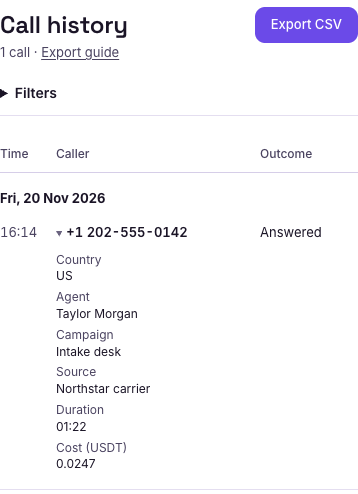
The same example call in the downloaded file (timestamp in UTC)
started_at,from_number,agent,campaign,upstream_source,duration_seconds,talk_seconds,outcome,cost_usdt
2026-11-20T15:14:00+00:00,"+1 202-555-0142","Taylor Morgan","Intake desk","Northstar carrier",82,74,answered,0.0247
Customer API access
Call History CSV export is the currently documented customer path for getting call records out of Dialviction. Tenant API keys and outbound event webhooks have been proposed, but are not available as a customer integration in this release.
Do not use a browser session credential as an integration key. Contact support to discuss a data export or an integration requirement.
Provider and platform callbacks
The platform also has authenticated call intake and provider callback routes for connected services. They are service connections managed by Dialviction and its integration partners. They are not tenant API endpoints.
For carrier connectivity, begin with the SIP trunking guide. For the agent path, see the softphone guide.